
From Clawdbot/Moltbot/OpenClaw: Empowering Your Personal AI Agent with Yollomi’s Visual Magic
Clawdbot/Moltbot has officially rebranded to OpenClaw. Discover how this viral AI agent integrates seamlessly with Yollomi to automate high-quality image and video generation through simple conversation.
The Evolution: From Clawdbot to Moltbot to OpenClaw
If you’ve been following the AI open-source community, you’ve likely seen the meteoric rise of Clawdbot.
Known for its incredible ability to act as a 24/7 personal assistant on platforms like WeChat and Telegram, it recently underwent a major rebranding.
Due to trademark considerations, Clawdbot has officially shed its old shell and emerged as Moltbot (named after the process of "molting"). While the name is new, its power as a highly capable, autonomous AI agent remains stronger than ever.
What is Moltbot?
Moltbot isn't just a chatbot; it’s an AI Agent designed to live on your local hardware (like a Mac Mini) and execute tasks on your behalf.
Key Features include:
-
Persistent Memory: It remembers your preferences and past instructions over long periods.
-
Proactive Execution: It doesn't just talk; it can browse the web, write code, and manage files autonomously.
-
Multi-Platform Presence: Control your digital life via your favorite messaging apps like Telegram or Discord.
Synergy: Bringing Yollomi’s Vision to Moltbot
The real magic happens when you combine Moltbot’s execution power with Yollomi’s professional-grade visual generation tools.
By linking the two, you can transform text into stunning visuals without ever opening a browser. Here is how they work together:
1. Seamless Image Generation
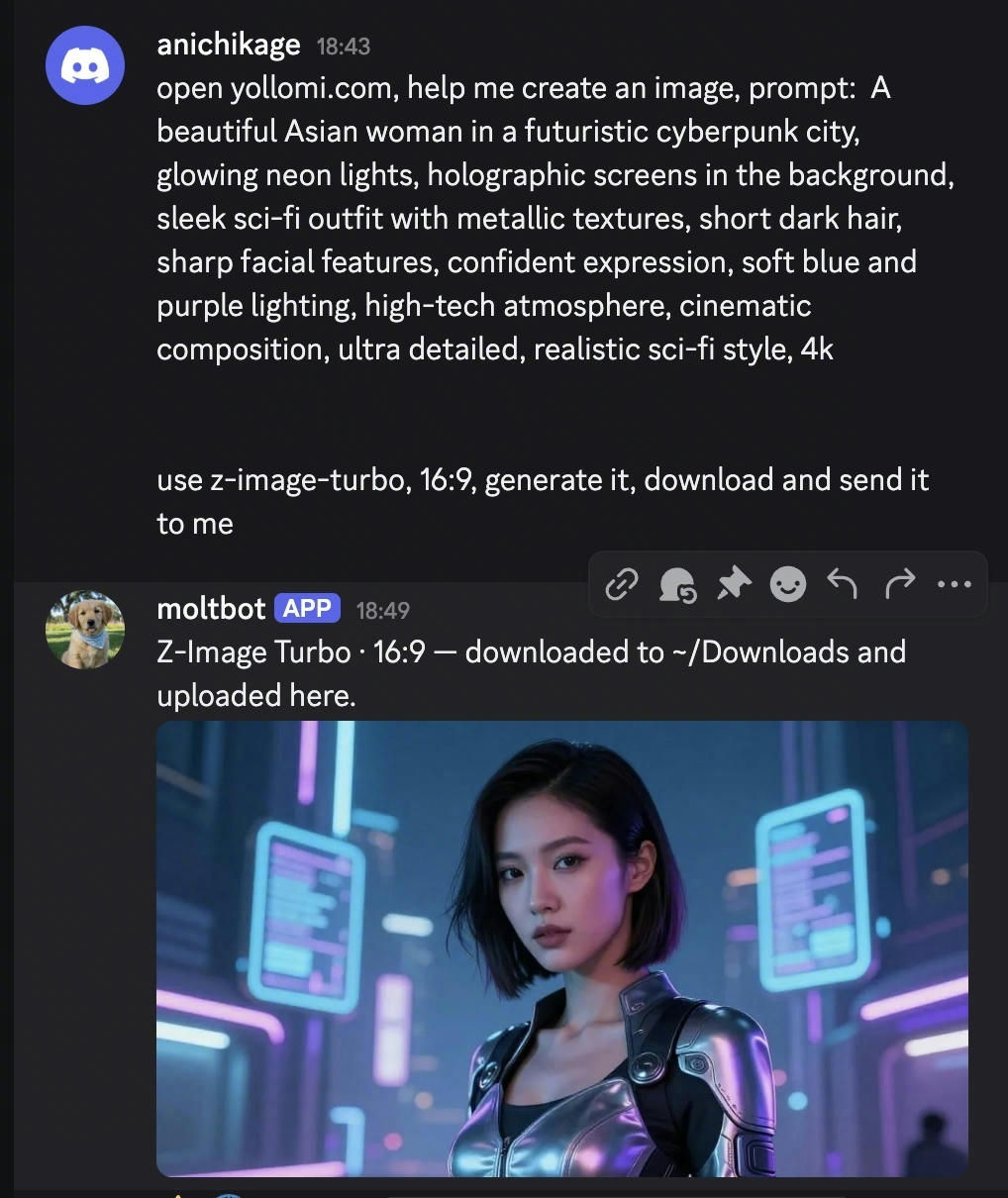
By integrating Yollomi's API or utilizing Moltbot's browser automation, you can simply message your agent:
"Hey, use Yollomi to create a futuristic cyberpunk landscape for my blog."
Moltbot handles the prompt optimization, sends it to Yollomi, and returns the high-resolution image directly to your chat window.
2. Automated Video Production
Need a quick social media clip? You can now tell Moltbot:
"Take the summary of this article and generate a 10-second cinematic video on Yollomi."
The agent coordinates the request, monitors the rendering progress, and notifies you the moment your video is ready for download.
How to Get Started
-
Deploy Moltbot: Download the latest release from the official GitHub repository and get it running locally.
-
Connect to Yollomi: Use your Yollomi API credentials or configure Moltbot’s "skills" to navigate the Yollomi interface.
-
Start Creating: Send your first visual prompt through your connected chat app and watch the AI collaboration come to life.
Conclusion
The transition from Clawdbot to Moltbot marks a new chapter for autonomous AI.
By pairing Moltbot’s "hands" with Yollomi’s "eyes," the barrier between an idea and a finished visual masterpiece has never been lower.
Ready to see what your Moltbot can create? Log in to Yollomi today and start building your automated creative studio.