Yollomi LogoYollomi
LoginFree Trial
Text to Image6 creditsModel guide

Imagen 4 Ultra AI image generator

Imagen 4 Ultra is best for high-quality text-to-image creation and marketing and social visuals. This guide explains when to use it, how to prompt it, and how it differs from nearby Yollomi models. It currently starts at 6 credits on Yollomi.

High-quality text-to-image creation

Marketing and social visuals

Portraits, products, and concept art

Reusable creative directions

Imagen 4 Ultra AI image generation example on Yollomi

Imagen 4 Ultra output examples

What you can create with Imagen 4 Ultra

Large visual examples first. Details stay below.

Visual guide
Imagen 4 Ultra Campaign Visuals example
Example output

Campaign Visuals

Create polished images for landing pages, ads, social campaigns, and creative pitches.

Imagen 4 Ultra Portrait and Product Ideas example
02

Portrait and Product Ideas

Turn prompts into portraits, product shots, creator assets, or branded image concepts.
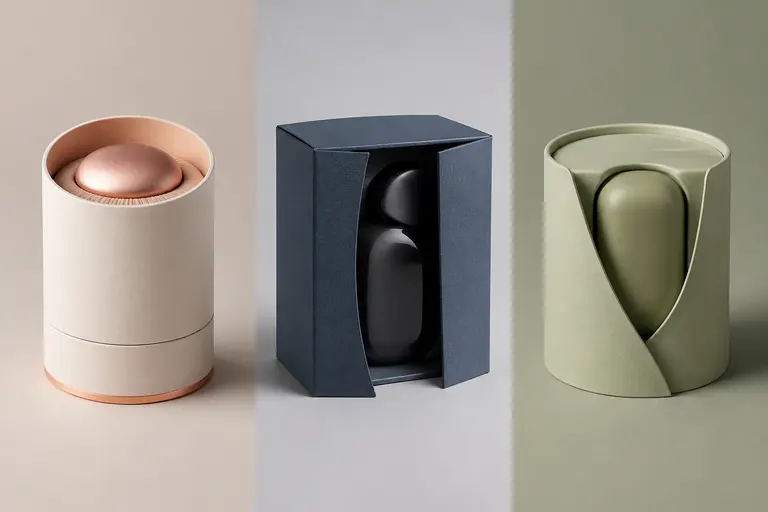
Imagen 4 Ultra Style and Format Testing example
03

Style and Format Testing

Compare aspect ratios, moods, lighting styles, and creative directions from one prompt family.

What makes Imagen 4 Ultra different

Imagen 4 Ultra is a Google model for polished images, campaign visuals, creator assets, and final-pass generations. Its page should target users who already know the model name and want to understand when it is the right choice, how to prompt it, and how it compares with adjacent image models.

How Imagen 4 Ultra fits into a real workflow

Use Imagen 4 Ultra when the brief can be described from text. Start with the subject and purpose, then add camera, lighting, format, style, and any constraints such as aspect ratio or no extra text.

Imagen 4 Ultra effect profile

Workflow

Text to Image

Provider

Google

Look

clean, realistic, commercially polished

Strength

turning detailed prompts into usable visual directions

Prompt sensitivity

responds best to clear subject, style, composition, lighting, and output-use instructions

Best output stage

final or near-final image generation

How to use Imagen 4 Ultra

Three steps. No long guide required.

Intent
Prompt
Refine
01

Pick the right intent

High-quality text-to-image creation

02

Start from a proven prompt

It gives the model subject, material, lighting, camera feel, and commercial purpose.

03

Compare and refine

Use Flux 2 Pro when cinematic polish and final-pass quality matter most.

How to prompt Imagen 4 Ultra

Start with the final use case: product hero, thumbnail, portrait, poster, concept art, or social ad.

Add composition and lighting language instead of relying on generic quality words.

Describe materials, mood, camera angle, and visual hierarchy.

Use precise constraints when the output needs to look production-ready.

What to watch out for

Premium-looking results still depend on detailed prompt direction.

Dense text, logos, or strict brand layouts may require GPT Image 2 or manual review.

Very broad prompts can make different models feel more similar than they really are.

Prompt lab

Imagen 4 Ultra prompt examples

Reusable recipes, collapsed by default.

Recipe structure
Subject
Exact text
Layout
Style
Constraints
01

Product Hero Image

premium ceramic coffee cup on a walnut desk, soft morning window light, shallow depth of field, minimal lifestyle product photography, clean space for headline
Full prompt + why
premium ceramic coffee cup on a walnut desk, soft morning window light, shallow depth of field, minimal lifestyle product photography, clean space for headline

It gives the model subject, material, lighting, camera feel, and commercial purpose.

02

Creator Portrait

confident tech creator portrait, dark navy background, soft blue rim light, friendly expression, professional editorial photo, 85mm lens
Full prompt + why
confident tech creator portrait, dark navy background, soft blue rim light, friendly expression, professional editorial photo, 85mm lens

It combines identity, mood, background, lighting, expression, and lens language.

03

Social Concept Art

futuristic city garden at sunset, glass towers covered with plants, people walking through warm mist, cinematic wide shot, optimistic climate-tech mood
Full prompt + why
futuristic city garden at sunset, glass towers covered with plants, people walking through warm mist, cinematic wide shot, optimistic climate-tech mood

It describes scene scale, environment, time of day, camera framing, and emotional direction.

Imagen 4 Ultra vs other models

Quick model choice.

Flux 2 Pro

Alternative

Use Flux 2 Pro when cinematic polish and final-pass quality matter most.

GPT Image 2

Alternative

Use GPT Image 2 when exact text, layout, or instruction following is the priority.

Nano Banana Pro

Alternative

Use Nano Banana Pro when the same person, character, or product must stay consistent across images.

?
?

FAQ

1

What is Imagen 4 Ultra best for?

Imagen 4 Ultra is best for high-quality text-to-image creation, marketing and social visuals, portraits, products, and concept art, reusable creative directions.

2

How should I prompt Imagen 4 Ultra?

Start with the final use case: product hero, thumbnail, portrait, poster, concept art, or social ad.

3

How many credits does Imagen 4 Ultra use?

Imagen 4 Ultra currently starts at 6 credits on Yollomi. Some settings may use more credits.